
🖱️ Mouse Jiggler — 鼠标自动移动工具(开源/无广告)
直播被挂播警告,写的小东西. 网上的按键精灵和一些东西都报毒, 防火墙会删掉. 这是我自己写的一个简洁小工具,可以自动移动鼠标,防止挂机、防息屏、防止电脑锁屏,非常适合用于直播、挂机、开发时保持“活跃”状态。
Windows系统应该都可以用, 其他的我不了解.
✅ 功能特色
⏱️ 支持自定义移动间隔(单位:秒)🧼 无广告、无弹窗、无联网、纯净绿色💻 可后台运行,保持鼠标“活跃”状态🔧 使用 .NET 8.0 编写,已打包为单文件 EXE
📦 下载地址
👉 点击下载 MouseJiggler.zip (下载后解压,运行 MouseJiggler.exe 即可)
🧪 使用方法
解压压缩包双击 MouseJiggler.exe 启动程序输入移动间隔(单位:秒),按回车程序将自动在后台移动鼠标关闭窗口即可退出程序
🔐 安全说明
纯 C# 编写,未调用任何外部库不开启网络连接,不读取磁盘文件源代码开源,安全透明可查
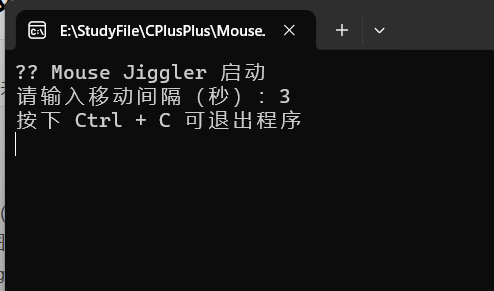
📸 运行界面截图(可自行替换)
程序启动界面如下图(你可以插入自己的截图):
💡 适用场景
直播防挂机(B站、抖音、虎牙等)公司电脑防锁屏 / 息屏写代码 / 渲染 / 编译时保持鼠标活动实验 / 模拟鼠标事件等用途
🧑💻 By:章章
using System;
using System.Runtime.InteropServices;
using System.Threading;
namespace MouseJiggler
{
internal class Program
{
static void Main()
{
Console.WriteLine("🎮 Mouse Jiggler 启动");
Console.Write("请输入移动间隔(秒):");
int interval = int.Parse(Console.ReadLine() ?? "5");
Console.WriteLine("按下 Ctrl + C 可退出程序");
while (true)
{
MoveMouse();
Thread.Sleep(interval * 1000);
}
}
static void MoveMouse()
{
var position = GetCursorPos();
SetCursorPos(position.X + 1, position.Y);
Thread.Sleep(50);
SetCursorPos(position.X, position.Y);
}
static (int X, int Y) GetCursorPos()
{
GetCursorPos(out var point);
return (point.X, point.Y);
}
[DllImport("user32.dll")]
static extern bool SetCursorPos(int X, int Y);
[DllImport("user32.dll")]
static extern bool GetCursorPos(out POINT lpPoint);
struct POINT
{
public int X;
public int Y;
}
}
}